PDF Reader - Mobile Viewer
Caller app studioTools
2.953.00 Reviews
- Version
- 1.0
- Installs
- 100.00K
- Age Rating
- Everyone
Screenshots
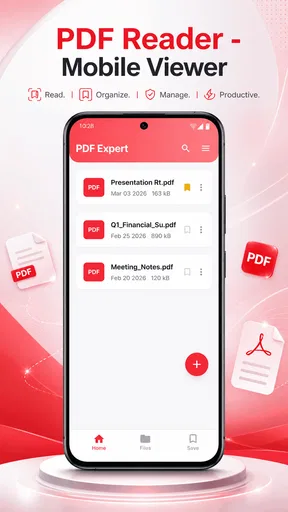
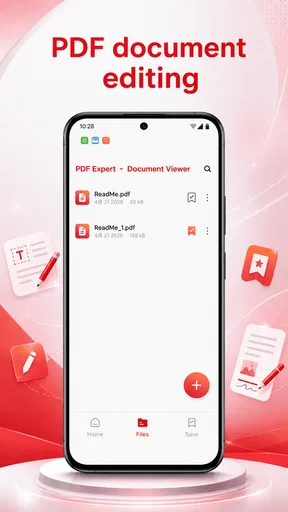
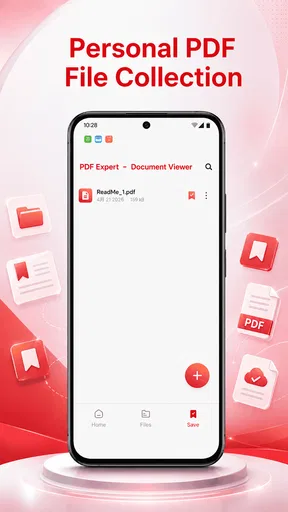
Our Review of PDF Reader - Mobile Viewer
 Analysis by Appyee
I spent time with PDF Reader - Mobile Viewer as a straightforward tool for opening and handling PDF documents on a phone. It is aimed at the everyday task most people actually need: finding a document, opening it without fuss, reading it on a smaller screen, and keeping track of files that would otherwise be scattered across downloads or messaging apps. That narrow focus is both its appeal and its main limitation.
The app comes from Caller app studio and is available free of charge for everyone. It belongs in the tools category rather than the office-suite space, so I approached it as a mobile document reader, not as a replacement for a full desktop PDF editor. The current release is version 1.0, and that matters when judging it: the experience feels like an early foundation, with the basic reading purpose clearly defined but less evidence of a mature document ecosystem around it.
Its store presence has attracted over one hundred thousand installs, while the average rating sits at 2.9 from roughly two hundred seventy ratings and a little over fifty written reviews. Those figures suggest that interest is real, but satisfaction is mixed. I would not dismiss the app because of that rating, yet I also would not install it expecting the polish of a long-established document platform.
How PDF Reader - Mobile Viewer fits into everyday phone use
I look at this app through the small moments when a PDF interrupts whatever I’m doing: a form arrives in a message, a schedule needs checking before I leave, or a manual is buried among recent downloads. A dedicated reader can make those moments feel less scattered, but only if returning to a file is as straightforward as opening it the first time. That everyday test also helps me decide what setup habits are worth adopting.
A focused reader rather than a complete office app
The first thing I noticed is how clearly the app’s purpose is framed. It is for opening, reading, and managing PDF files on mobile. That makes it useful when I receive a form in a chat, download a manual from a website, or need to check a document while away from a computer. I do not have to think of it as a complicated productivity suite; its value comes from giving PDF files a dedicated place on the phone.
That distinction is important. Many phones can already open PDFs through a browser, a file manager, or a general cloud application. Those alternatives may be enough for a single document. A separate reader becomes more worthwhile when PDFs are part of a regular routine and I want a consistent way to return to them instead of relying on whichever app happens to claim the file first.
In my experience, the best reason to try this app is convenience, not advanced document work. If your goal is simply to read a timetable, instruction sheet, application form, study handout, or receipt, a focused viewer can feel less distracting than an office app filled with editing, collaboration, and storage features you never use.
A realistic commute and paperwork scenario
Imagine receiving a several-page insurance document by email just before an appointment. On a phone, the practical challenge is not only opening it; it is moving through pages, checking a particular paragraph, and returning to the file later without searching through the original message. This is the kind of small, repeated task where a dedicated PDF reader can earn its place.
I would use it similarly for a travel confirmation, a school handout, or a product manual downloaded before leaving home. My preferred workflow is to save the file with a recognizable name, open it through the viewer, and keep the original message or download location available in case I need to share it again. That last step is easy to overlook: a reader can display a document, but it is not automatically a complete filing system for personal records.
For people who read on a phone one-handed, the experience also depends on sensible zooming and page movement. A PDF that looks comfortable on a laptop can be frustrating on a narrow screen. I found it more useful to treat the app as a quick inspection tool for ordinary pages rather than assuming every complex layout will be pleasant to read on mobile.
What the current version tells me
Version 1.0 gives PDF Reader - Mobile Viewer a clear starting point, but it also sets expectations. I see a product focused on the central viewing task rather than one that has already expanded into a broad document workflow. The release date is May 7, 2026, so the sensible way to judge it is as an early version whose future usefulness may depend on how Caller app studio responds to practical feedback.
I would be cautious about treating the current release as a finished answer for professional document handling. An early version can be perfectly adequate for casual reading while still needing refinement in navigation, file organization, compatibility with unusual PDFs, and the small details that become important after daily use. Those are not minor concerns if the app is going to handle work documents or a large personal archive.
At the same time, starting with a limited purpose can be a strength. A reader that avoids unnecessary complexity may be easier for someone who only wants to open a PDF without learning a full office application. The question is not whether it has every possible feature; it is whether its basic behavior is dependable enough for the documents you personally need to read.
How it compares with the usual alternatives
The most obvious alternative is the PDF support already built into a browser or phone file manager. That option wins when I open a document once and do not care where it goes afterward. It is already present, usually requires no extra setup, and can be perfectly acceptable for a short file. PDF Reader - Mobile Viewer makes more sense when I want a dedicated destination and a more deliberate reading habit.
Cloud storage apps are better when the same document must stay synchronized across phones, tablets, and computers. They generally fit a workflow where files live online and are shared with other people. I would choose one of those instead if cross-device access or collaborative storage mattered more to me than having a simple mobile viewer.
Full office applications are the stronger choice for editing, signing, converting, commenting, or building documents. Installing this reader with the expectation that it will replace those tools would be a mistake. Its appeal is precisely that it does not ask me to manage a whole office workflow just to read a PDF.
There is also a privacy and control trade-off in choosing any separate document app. Before opening sensitive tax, medical, employment, or identity documents, I would check how the app handles files and what access it requests on my device. The available description establishes the reading purpose, but responsible use still means avoiding unnecessary exposure of confidential material and keeping important originals backed up elsewhere.
Small workflow habits that make it more useful
One useful habit is to rename downloaded PDFs before opening them when the original filename is vague. A file called “document” is difficult to recognize later, especially after several messages or downloads. Naming it by purpose, such as “rental terms” or “course schedule,” makes the reader’s file-management role more practical even without turning it into a formal archive.
A second tip is to separate quick reading from long-term storage. I would use the app to inspect a file, then keep important documents in a clearly organized folder or trusted backup location. This reduces the risk of confusing the viewer with the only copy of a document that matters. It also makes changing apps later less disruptive.
A third trade-off appears with large or visually complicated PDFs. A simple viewer may be comfortable for text-heavy pages but less convenient when a document contains dense tables, wide diagrams, unusual fonts, or interactive elements. If a file is central to work or study, I would test that exact document instead of assuming that success with a basic handout guarantees the same experience everywhere.
Who should try it and who should skip it
I would recommend trying PDF Reader - Mobile Viewer if you want a free, uncomplicated way to read ordinary PDF files on an Android device running version 8.0 or later. It is particularly suitable for occasional readers who are tired of opening documents through unrelated apps, or for someone who wants a dedicated tool without paying for a larger office package.
I would also consider it for a secondary phone used for travel, study, or household paperwork. In that role, the app’s focused identity could be more useful than a feature-heavy suite. A person who mainly downloads manuals, schedules, forms, and reference documents does not necessarily need editing or collaboration functions.
I would skip it as my primary document solution if I regularly annotate contracts, fill interactive forms, add signatures, convert files, synchronize a library across several devices, or share documents with a team. In those situations, a mature office or cloud platform is likely to save time even if it feels heavier. I would also hesitate if my PDF collection is large enough that search, sorting, and reliable long-term organization are essential rather than optional.
Where the mixed reception matters
The average rating of 2.9 is the clearest warning sign for a cautious installation. It does not tell me that every user will have a poor experience, but it does tell me not to assume that the first version meets everyone’s expectations. The written review count is much smaller than the install total, so the rating reflects a limited slice of users, yet the overall signal is still worth taking seriously.
For me, the right response is to test the app with low-risk documents first. I would open a few PDFs that represent my normal use: a short text document, a multipage file, and one with a table or image. I would then decide whether the navigation and file handling feel dependable enough before moving any private or important paperwork into the routine.
That approach also avoids a common mistake: judging a reader only by whether it opens one file. The real test is what happens when I return to a document later, switch between files, read on a small screen, and try to locate something I downloaded earlier. Everyday friction shows up in those transitions, not in the first successful launch.
What I would watch as the app develops
Because the current release is version 1.0, future improvements will be especially important. I would watch for clearer file organization, smoother movement through longer documents, dependable handling of different PDF layouts, and practical reading controls that make phone use less tiring. These are the areas that would turn a basic viewer into a tool I could confidently use every day.
I would also pay attention to how updates affect existing users. A good evolution path should improve reliability without making simple reading harder. New functions are welcome, but not if they bury the central action of opening a document. For this app, restraint could be as valuable as expansion: better handling of the basics would matter more to me than a long list of loosely connected extras.
Another point to watch is whether the developer builds trust around sensitive documents. Clear behavior, predictable file access, and careful treatment of personal paperwork would make a meaningful difference. I would not choose a document reader for important records solely because it has a clean interface; confidence in the surrounding workflow matters just as much as page display.
My final take after using it
PDF Reader - Mobile Viewer is an understandable, free tool for people who want a dedicated place to open and read PDFs on a compatible Android phone. I like the narrow purpose because it avoids pretending to be an entire office. For quick documents and occasional mobile reading, that simplicity can be enough.
Still, I would approach it as an early-stage option, not an automatic recommendation for demanding work. The 2.9 average and the mixed user response make testing sensible, while version 1.0 means the product’s longer-term direction remains important. I would keep valuable originals backed up, try representative files before relying on it, and choose a more established alternative for editing, synchronization, signatures, or professional document management.
My honest recommendation is therefore conditional: give it a chance if your needs stop at reading and basic file handling, especially if you want to avoid a bulky office suite. If your PDFs are part of a serious workflow, wait until the app demonstrates stronger depth and consistency. Its best quality is its focused purpose, and its biggest question is whether that foundation will mature into a dependable everyday reader.
Verdict
Strengths of PDF Reader - Mobile Viewer
- Opens PDFs quickly, even on older phones.
- Supports pinch-to-zoom for comfortable reading.
- Simple interface is easy for first-time users.
- Useful for viewing documents without a computer.
- Keeps reading focused with minimal distractions.
Limitations of PDF Reader - Mobile Viewer
- Some advanced editing features may be unavailable.
- Large PDFs can take longer to load.
- Ads may interrupt the reading experience.
- Text extraction quality varies by document format.
- Requires separate tools for signing or annotating files.
Other Releases by Caller app studio
View All
KJV Bible - Verse Daily
Personalization4.7
Similar Picks in This Category
View All
Google LLC4.0

Gboard - the Google Keyboard
Google LLC4.5

Google Play services
Google LLC4.3

Google Play Store
Google LLC4.9

Files by Google
Google LLC4.5

SHAREit: Transfer, Share Files
Smart Media4U Technology Pte.Ltd.4.3
Frequently Asked Questions
What is PDF Reader - Mobile Viewer used for?
PDF Reader - Mobile Viewer is designed for opening, reading, and managing PDF documents on a mobile device. After installing it, users can browse files stored on their phone, view documents in a more comfortable reading layout, and quickly access recently opened PDFs. It is useful for ebooks, forms, receipts, manuals, study materials, and work-related documents when a desktop computer is not available.
Can PDF Reader - Mobile Viewer open PDFs stored on my phone?
Yes, the application is intended to locate and open PDF files saved on your device. Depending on your phone’s file structure and Android or iOS permissions, you may need to allow access to local storage or select a document through the system file picker. Once permission is granted, the app can help you find downloaded, shared, or manually transferred PDF files in one place.
Does PDF Reader - Mobile Viewer work without an internet connection?
PDF Reader - Mobile Viewer can generally be used offline for documents that are already stored on your device. This means you can read downloaded PDFs while traveling, commuting, or working in areas with limited connectivity. Internet access may still be required for downloading files from online locations, displaying advertisements, syncing with external services, or using any cloud-related features included in the current version.
Does the app support tools such as search, zoom, and page navigation?
The app provides the basic controls most people expect from a mobile PDF viewer, including page-by-page navigation, zooming, and document searching where supported by the file and app version. These tools make it easier to read small text, locate specific words, and move through lengthy documents. Users should check the interface after installation because advanced options may vary between releases.
Is PDF Reader - Mobile Viewer free and safe to install?
PDF Reader - Mobile Viewer may be available as a free download, although the exact experience can include advertising, optional purchases, or limitations depending on the version distributed through the official app store. For safety, download it only from a trusted Google Play or Apple App Store listing, review the developer information, and examine requested permissions. Avoid unofficial APKs or modified copies that could contain unwanted software.
